
TypeScript Backend Framework
Deepkit Framework is a TypeScript backend framework where one type is the validator, the JSON format, the database schema and the API documentation. It brings an HTTP and RPC server, ORM, dependency injection, CLI and configuration in one application.
//app.ts
import { App } from '@deepkit/app';
import { FrameworkModule } from '@deepkit/framework';
import { http, HttpBody } from '@deepkit/http';
import { Logger } from '@deepkit/logger';
import { Email, MinLength } from '@deepkit/type';

interface CreateUser {
    username: string & MinLength<3>;
    email: string & Email;
}

class UserService {
    constructor(private logger: Logger) {}

    create(input: CreateUser) {
        this.logger.log(`New user ${input.username}`);
        return { id: 1, ...input };
    }
}

class UserController {
    constructor(private users: UserService) {}

    @http.POST('/users')
    create(body: HttpBody<CreateUser>) {
        return this.users.create(body);
    }
}

new App({
    controllers: [UserController],
    providers: [UserService],
    imports: [new FrameworkModule()],
}).run();
$ ts-node app.ts server:start

$ curl -X POST localhost:8080/users -H 'content-type: application/json' \
    -d '{"username":"Peter","email":"[email protected]"}'
{"id":1,"username":"Peter","email":"[email protected]"}

$ curl -X POST localhost:8080/users -H 'content-type: application/json' \
    -d '{"username":"ab","email":"nope"}'
HTTP/1.1 400 Bad Request
{
  "message": "Validation error: ...",
  "errors": [
    {
      "path": "username",
      "code": "minLength",
      "message": "Min length is 3",
      "value": "ab"
    },
    ...
  ]
}
The body is validated from the CreateUser interface before the method runs, and UserService is injected from its type. A new project starts with npm init @deepkit/app@latest my-app.
Comparison with NestJS and Express
| Deepkit Framework | NestJS | Express or Fastify | |
|---|---|---|---|
| Request validation | From the TypeScript type | Decorated classes and a validator pipe | Added by you |
| Dependency injection | Built in, no decorators needed | Built in, with @Injectable() | Added by you |
| ORM | Built in | Added by you | Added by you |
| RPC | Built in | Added through a transport | Added by you |
| Build step | Deepkit type compiler | TypeScript compiler | Optional |
Deepkit needs its type compiler in your build, because it reads your types at runtime. Express and NestJS have much larger ecosystems, which can matter more than the built-in features. Performance is listed on the benchmarks page.
What the framework includes
Deepkit Framework is based on Deepkit App in @deepkit/app and provides the FrameworkModule module in @deepkit/framework, which can be imported in your application.
The App abstraction brings:
- CLI commands
- Configuration loading (environment, dotfiles, custom)
- Module system
- Powerful Service Container
- Registry and hooks for controllers, providers, listeners, and more
The FrameworkModule module brings additional features:
- Application server
- HTTP server
- RPC server
- Multi-process load balancing
- SSL
- Debugging CLI commands
- Database Migration configuration/commands
- Debugging/Profiler GUI via
{debug: true}option - Interactive API documentation (like Swagger)
- Providers for DatabaseRegistry, ProcessLocking, Broker, Sessions
- Integration Test APIs
You can write applications with or without the FrameworkModule.
Installation
Deepkit Framework is based on Deepkit App. Make sure you followed its installation instructions.
If so you can install Deepkit framework and import the FrameworkModule in your App.
npm install @deepkit/framework
import { App } from '@deepkit/app';
import { FrameworkModule } from '@deepkit/framework';
import { Logger } from '@deepkit/logger';

const app = new App({
    imports: [new FrameworkModule({ debug: true })]
});

app.command('test', (logger: Logger) => {
    logger.log('Hello World!');
});

app.run();
Since the app now imports the FrameworkModule, we see there are more commands available grouped into topics.
One of them is server:start, which starts the HTTP server. To use it, we have to register at least one HTTP route.
import { App } from '@deepkit/app';
import { FrameworkModule } from '@deepkit/framework';
import { HttpRouterRegistry } from '@deepkit/http';
import { Logger } from '@deepkit/logger';

const app = new App({
    imports: [new FrameworkModule({ debug: true })]
});

app.command('test', (logger: Logger) => {
    logger.log('Hello World!');
});


const router = app.get(HttpRouterRegistry);

router.get('/', () => {
    return 'Hello World';
})

app.run();
When you execute the server:start command again, you will see that the HTTP server is now started and the route / is available.
$ ts-node app.ts server:start
$ curl http://localhost:8080/
Hello World
To serve requests please read chapter HTTP or RPC. In chapter App you can learn more about CLI commands.
App
The App class is the main entry point for your application. It is responsible for loading all modules, configuration, and starting the application.
It is also responsible for loading all CLI commands and executing them. Modules like FrameworkModule provide additional commands, register event listeners,
provide controllers for HTTP/RPC, service providers and so on.
This app object can also be used to access the Dependency Injection container without running a CLI controller.
const app = new App({
    imports: [new FrameworkModule]
});

//get access to all registered services
const eventDispatcher = app.get(EventDispatcher);
You can retrieve the EventDispatcher because the FrameworkModule registers it as a service provider like many other (Logger, ApplicationServer, and much more).
You can also register your own service.
class MyService {
    constructor(private logger: Logger) {
    }

    helloWorld() {
        this.logger.log('Hello World');
    }
}

const app = new App({
    providers: [MyService],
    imports: [new FrameworkModule]
});

const service = app.get(MyService);

service.helloWorld();
Debugger
The configuration values of your application and all modules can be displayed in the debugger. Enable the debug option in FrameworkModule and open http://localhost:8080/_debug/configuration.
import { App } from '@deepkit/app';
import { FrameworkModule } from '@deepkit/framework';

new App({
    imports: [
        new FrameworkModule({
            debug: true,
        })
    ]
}).run();
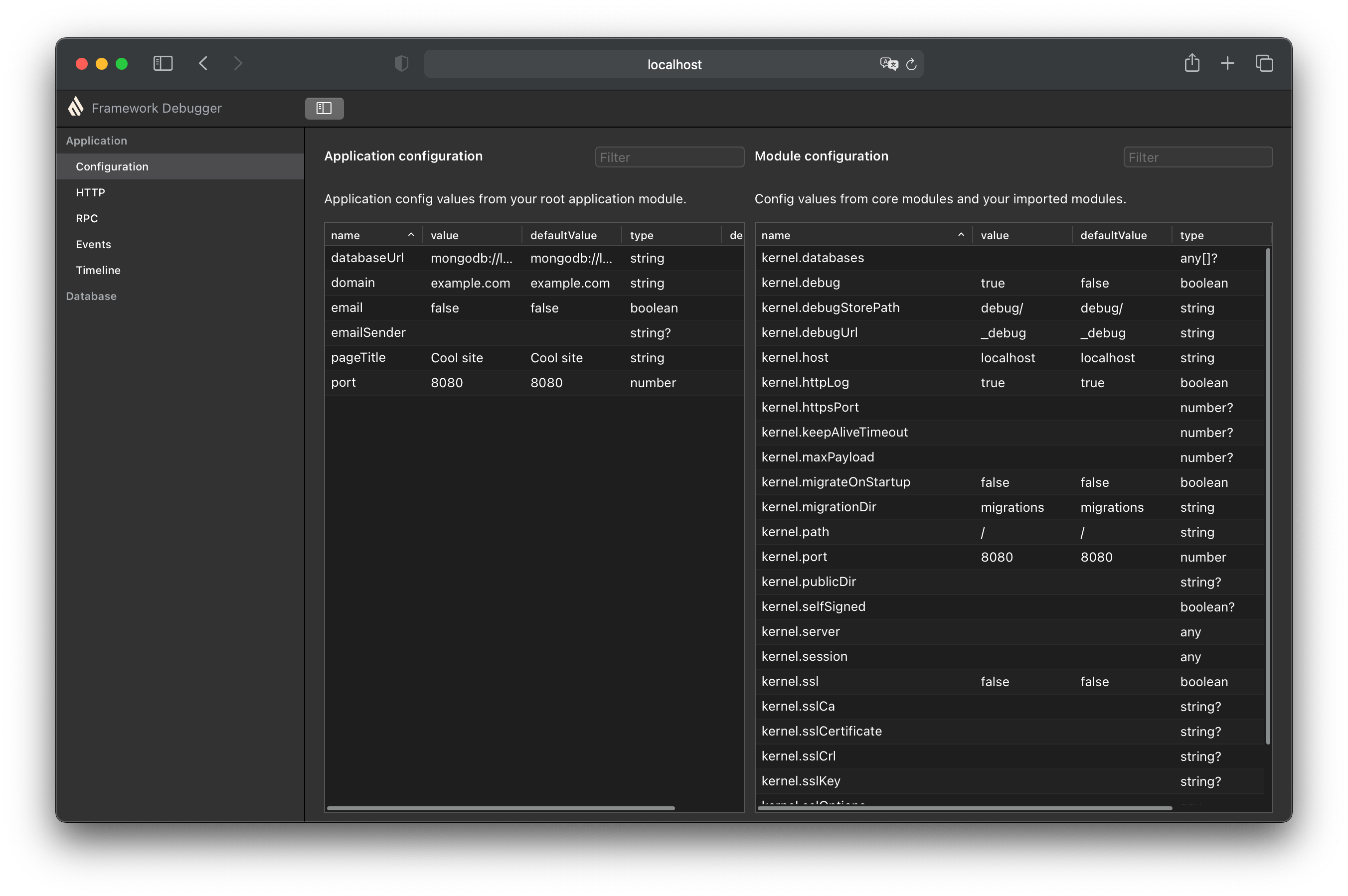
You can also use ts-node app.ts debug:config to display all available configuration options, the active value, their default value, description and data type.
Events
Deepkit framework comes with various event tokens on which event listeners can be registered.
See the Events chapter to learn more about how events work.
Dispatch Events
Events are sent via the EventDispatcher class. In a Deepkit app, this can be provided via dependency injection.
import { cli, Command } from '@deepkit/app';
import { BaseEvent, EventDispatcher, EventToken } from '@deepkit/event';

class UserEvent extends BaseEvent {
    constructor(public user: { username: string }) {
        super();
    }
}

const UserAdded = new EventToken<UserEvent>('user.added');

@cli.controller('test')
export class TestCommand implements Command {
    constructor(protected eventDispatcher: EventDispatcher) {
    }

    async execute() {
        const event = new UserEvent({ username: 'Peter' });
        await this.eventDispatcher.dispatch(UserAdded, event);
    }
}